Binder, corkboard, outline, and inspector
Plan on the left, write in the middle, and keep synopsis, status, and notes on the right - plus corkboard and outline views.
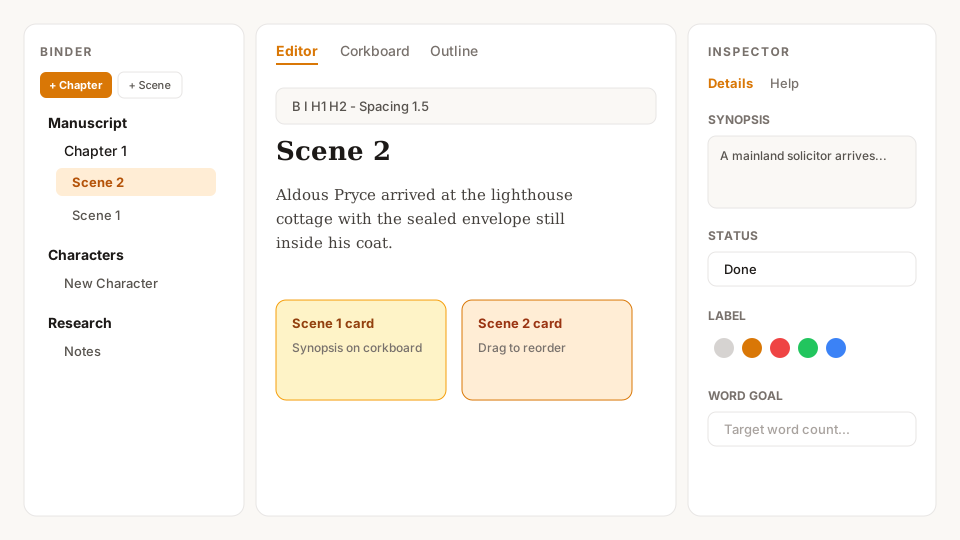
Inside a book, AuthorsDrop mirrors a classic writing studio. The binder holds chapters, scenes, acts, research, and characters. The centre editor is where you draft. The inspector keeps per-scene synopsis, notes, status, colour labels, and word goals. Switch the centre tabs to Corkboard (index cards) or Outline when you need the big picture.
What you can do
- Add chapters or acts, scenes, and character sheets from the binder bar
- Drag to reorder; double-click to rename
- Corkboard cards use each scene’s synopsis
- Inspector Help tab stays open as a quick reference while you write
More detail: How the workspace fits together
#tryauthorsdrop · #authorsdrop - tryauthorsdrop.com · authorsdrop.com
30 days free. Pay once. Keep writing. No subscription.
#tryauthorsdrop · #authorsdrop · tryauthorsdrop.com · authorsdrop.com