AuthorsDrop vs Scrivener: Which Writing App Is Better for Authors?
A balanced comparison of AuthorsDrop and Scrivener for novelists, non-fiction authors, screenwriters, playwrights and long-form writers.
Scrivener is one of the most respected names in long-form writing software. It has been used by novelists, academics, non-fiction authors, screenwriters and many writers who simply outgrew ordinary word processors. Any honest comparison with Scrivener has to begin by recognising that it is a serious, capable and well-established writing tool.
AuthorsDrop approaches the same problem from a newer direction. It asks a simple question: can long-form writing software give authors the structure they need without making the software feel like another project to manage?
Both applications understand something Microsoft Word does not fully attempt to understand. A book is not merely a document. It is a collection of scenes, ideas, research, notes, characters and revisions. The difference lies in how each application presents that structure to the writer.
Quick comparison
| Feature | AuthorsDrop | Scrivener |
|---|---|---|
| Built for long-form writing | Yes | Yes |
| Binder-style organisation | Yes | Yes |
| Corkboard planning | Yes | Yes |
| Outline view | Yes | Yes |
| Research folders | Yes | Yes |
| Character records | Yes | Possible with templates and folders |
| Novel writing | Yes | Yes |
| Non-fiction writing | Yes | Yes |
| Screenplay writing | Yes | Yes |
| Stage play writing | Yes | Possible |
| Dissertation writing | Yes | Yes |
| Simple modern interface | Strong focus | More complex and configurable |
| Export to Word and PDF | Yes | Yes |
| Best suited to | Writers wanting structure without overload | Writers wanting deep control and configuration |
Scrivener remains a powerful authoring studio
Scrivener earned its reputation because it solved a real writer problem. Instead of forcing an author to manage one enormous document, it introduced a project-based writing environment where manuscript sections, notes and research could sit together. Its Binder, Corkboard, Outliner and Compile tools are central to that appeal.
That makes Scrivener particularly strong for writers who enjoy detailed control. You can create complex project structures, store research, rearrange scenes and compile manuscripts into different formats. For authors who already know the software, Scrivener can feel like a trusted workshop where every drawer has a purpose.
The disadvantage is that the same depth can feel heavy to a new writer. Scrivener is not difficult because it is badly designed. It is difficult because it gives the writer a lot to control. Some people love that. Others open it, admire its power and then quietly return to a simpler tool.
AuthorsDrop focuses on the writer’s route through the project
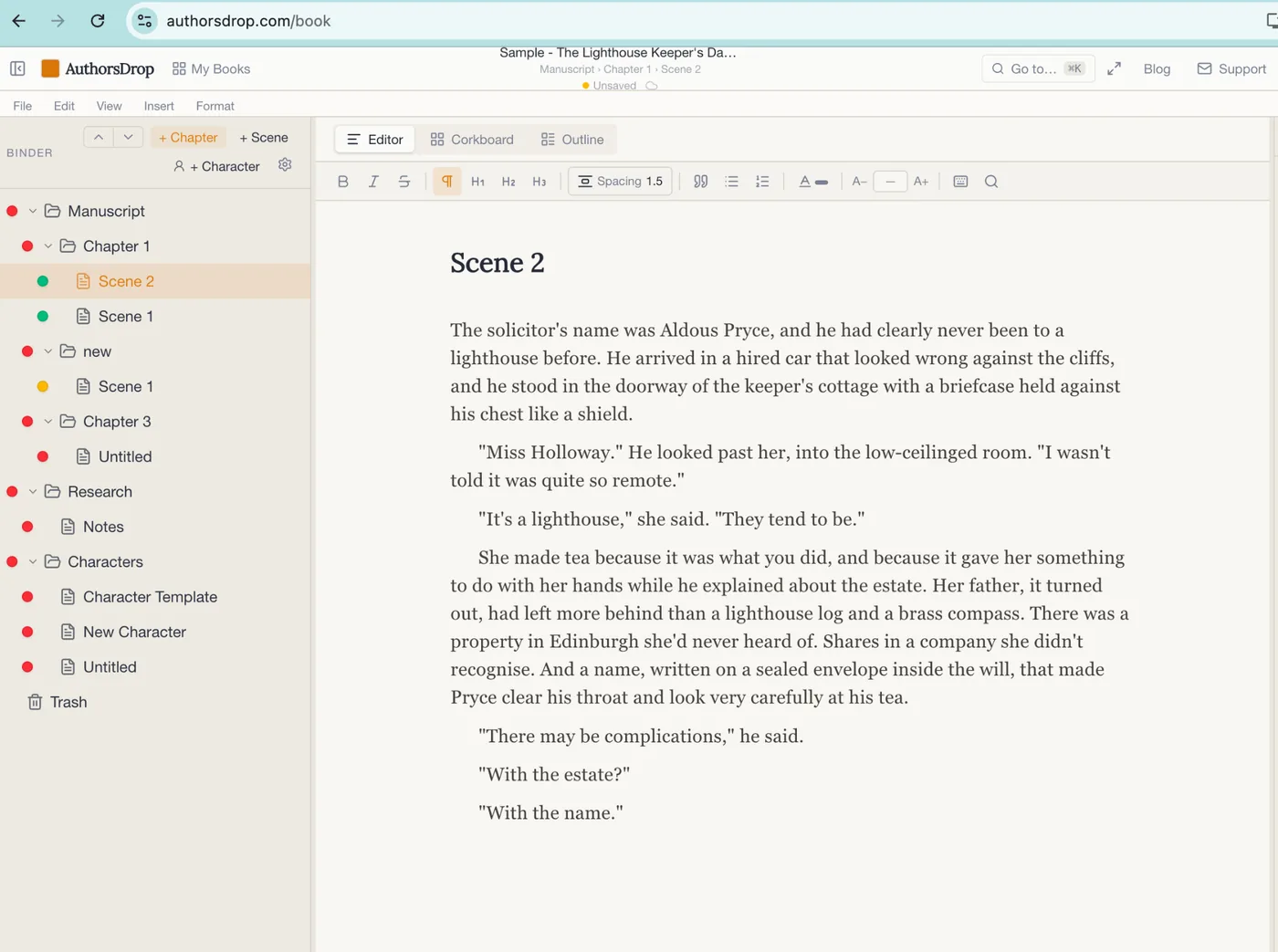
AuthorsDrop shares Scrivener’s belief that long-form writing needs structure, but it tries to make that structure feel more immediate. The Binder is central, giving writers chapters, scenes, research and characters in one visible workspace.
The goal is not to hide organisation. The goal is to make organisation obvious. A writer should be able to see the shape of the book, move through it quickly and understand where each part belongs without spending days learning the system.
This matters because many writers do not need endless configuration. They need a place to write chapter one, add scene two, check a character note, leave a reminder, reorganise the structure and export the manuscript when it is ready.
The biggest difference is complexity
Scrivener gives writers a deep box of tools. AuthorsDrop gives writers a focused writing workspace.
That distinction will appeal to different people. A writer who loves adjusting export settings, building custom templates and shaping the project around a highly personal system may prefer Scrivener. A writer who wants a cleaner route from idea to finished manuscript may prefer AuthorsDrop.
Neither approach is wrong. The question is which one helps you keep writing.
Planning and structure
Both applications support planning. Scrivener is famous for its Corkboard and Outliner, which allow writers to view manuscript sections as cards or structured lists. AuthorsDrop also includes Corkboard and Outline views, but keeps them closely tied to the central writing workflow.
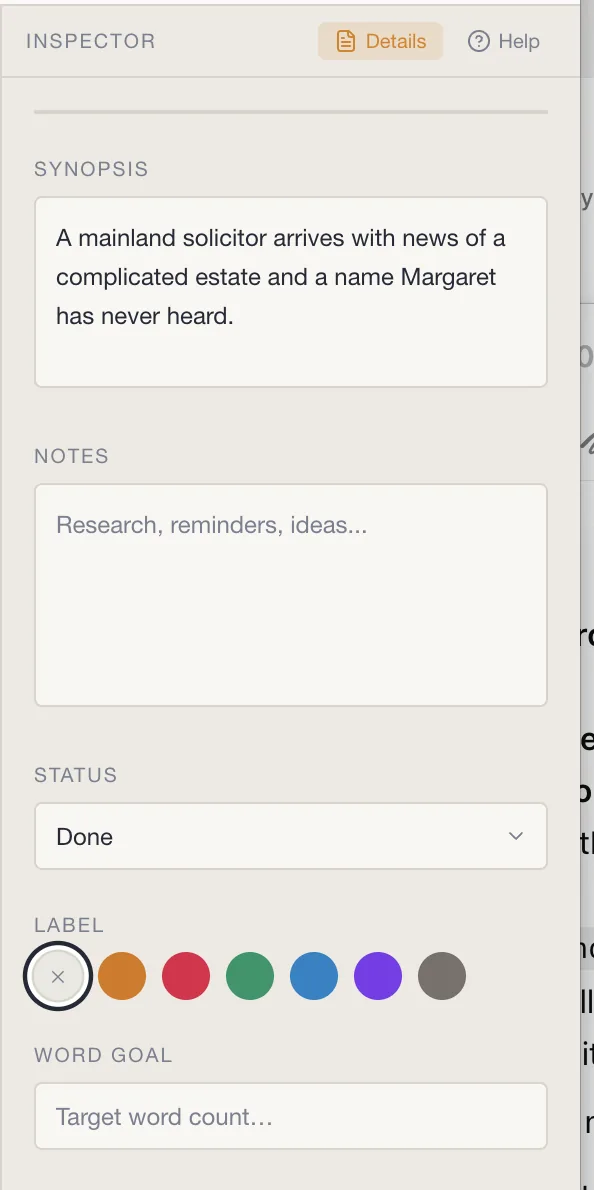
In AuthorsDrop, each scene can carry synopsis, notes, status, labels and word goals. This creates a useful bridge between planning and writing. The writer is not forced to become a project manager, but the important reminders remain near the work.
That is particularly useful during revision. A first draft usually moves forward. An edit moves everywhere. Scenes are cut, combined, reordered and rewritten. The easier it is to understand the project at a glance, the less energy is wasted simply finding things.
Screenplays and stage plays
Scrivener includes scriptwriting support, and many writers have used it for scripts. AuthorsDrop also includes screenplay and stage play support, but makes that part of a broader writing platform that also covers novels, non-fiction and dissertations.
This is important for writers who work across forms. Many authors do not stay in one lane. They may write a novel, adapt it into a screenplay, draft a play, build a non-fiction guide or prepare academic work. AuthorsDrop is designed to keep those project types within one recognisable environment.
Scrivener is also flexible enough for many of those jobs, but AuthorsDrop aims to make the choice of writing mode feel clearer from the start.
Research and characters
Both tools understand that writing is surrounded by supporting material. Scrivener is very strong here, allowing research documents, notes, images and other materials to live inside the project. AuthorsDrop also keeps research beside the manuscript, while giving character work a direct place in the Binder.
For fiction writers, character continuity is not a minor convenience. It is the difference between a confident revision and a long search through scattered notes. For non-fiction writers, research proximity helps prevent the book from becoming a folder full of half-remembered fragments.
Export, book production and finishing
Scrivener’s Compile system is powerful and highly configurable. AuthorsDrop takes a more direct route and now extends beyond manuscript export. Authors can write and organise inside AuthorsDrop, compile files for editors or collaborators, and, for prose books, continue into AuthorsDrop Press for layouts, front matter, trim sizes, EPUB export and print-ready PDF output.
That makes AuthorsDrop’s intended workflow broader than drafting alone: the same project can move from first idea through manuscript development and into publication-ready book files.
Who should choose Scrivener?
Scrivener remains an excellent choice for writers who want a mature, highly configurable authoring system. It is especially suited to authors who enjoy building their own workflow and are willing to learn the software properly.
If you already use Scrivener confidently and it helps you complete books, there may be no urgent reason to leave it.
Who should choose AuthorsDrop?
AuthorsDrop is designed for writers who want the benefits of long-form writing software without the feeling of entering a complicated control room. It is especially useful for writers who want to organise chapters, scenes, research and characters quickly, move between novels, scripts, plays, non-fiction and dissertations, and keep prose books in the same platform when they reach the formatting and publishing stage.
It is not trying to be Scrivener with a different logo. Its direction is a cleaner end-to-end writing and publishing workflow, with structure during the draft and AuthorsDrop Press when a prose manuscript becomes a book.
Final verdict
Scrivener is powerful, respected and proven. AuthorsDrop is newer and focused on a more direct workflow that joins long-form writing with book production.
Scrivener remains relevant for writers who want deep configuration and an established authoring system. AuthorsDrop is aimed at writers who want a modern workspace for organising and writing, with the option to carry prose books into formatting, EPUB and print-ready PDF output without leaving the platform.
Frequently asked questions
Is Scrivener good for writing novels?
Yes. Scrivener is a respected long-form writing application with strong organisation, research, corkboard and export tools. Many authors use it successfully for novels, non-fiction and scripts.
How is AuthorsDrop different from Scrivener?
AuthorsDrop combines a cleaner long-form writing workspace with novels, screenplays, stage plays, non-fiction, dissertations, research and planning tools, plus AuthorsDrop Press for prose book formatting, EPUB export and print-ready PDF output.
Which is easier to learn?
Scrivener is powerful but can feel dense to new users. AuthorsDrop is intended to reduce that learning curve and help writers begin organising and writing quickly.
Can AuthorsDrop replace Scrivener?
For writers who want a simpler long-form workspace with built-in support for multiple project types, AuthorsDrop can be a strong alternative. Scrivener remains a strong choice for writers who enjoy detailed configuration and a mature established workflow.
Source note
This comparison was written with reference to Scrivener’s public product information and help material describing its Binder, Corkboard, Outliner, scriptwriting and Compile features.