AuthorsDrop vs Google Docs: Which Is Better for Writing a Book?
Compare AuthorsDrop and Google Docs for long-form writing, collaboration, research, novel structure, screenplays and manuscript organisation.
Google Docs is one of the easiest writing tools to recommend. It opens in a browser, saves automatically, works across devices and makes collaboration remarkably simple. For short documents, shared notes, editorial comments and team writing, it is excellent.
The question is whether Google Docs is the best place to build a whole book.
AuthorsDrop and Google Docs begin with very different assumptions. Google Docs assumes you are creating an online document. AuthorsDrop assumes you are creating a long-form writing project with structure, research, notes, characters and revision needs.
That difference becomes more important the longer the manuscript grows.
Quick comparison
| Feature | AuthorsDrop | Google Docs |
|---|---|---|
| Browser access | Yes | Yes |
| Real-time collaboration | Limited compared with Docs | Excellent |
| Novel writing | Yes | Yes, with manual organisation |
| Screenplay writing | Yes | Requires templates or manual formatting |
| Stage play writing | Yes | Requires templates or manual formatting |
| Chapter and scene structure | Built in | Manual |
| Binder navigation | Yes | No equivalent |
| Corkboard planning | Yes | No equivalent |
| Character records | Yes | Separate document or table |
| Research folders | Yes | Separate Docs, Drive folders or links |
| Word goals and status labels | Yes | Manual workaround |
| Best suited to | Long-form writing projects | Collaborative online documents |
Google Docs is brilliant for collaboration
Google Docs changed the way people work together on documents. Its greatest strength is still collaboration. Several people can open the same file, leave comments, suggest edits, share links and work from the latest version without sending attachments back and forth.
For students, editorial teams, businesses and beta-reading workflows, that is genuinely useful. If your main problem is sharing text with other people, Google Docs is one of the strongest options available.
Its simplicity is also attractive. Open a document and type. There is very little friction at the beginning.
The difficulty arrives later, when the writing stops being one document and becomes a book.
A book needs more than shared typing
A novel or non-fiction book has hidden structure. The reader sees chapters and finished pages. The writer has to manage everything behind them: research, character notes, scenes, discarded ideas, continuity, revision status and the question of what belongs where.
In Google Docs, that usually means building your own system. You might create one document per chapter, another for research, another for character notes and several Drive folders to keep everything together. This can work, but the software is not guiding the process. You are.
AuthorsDrop is built to make that organisation part of the workspace rather than a side project.
AuthorsDrop gives structure to the manuscript
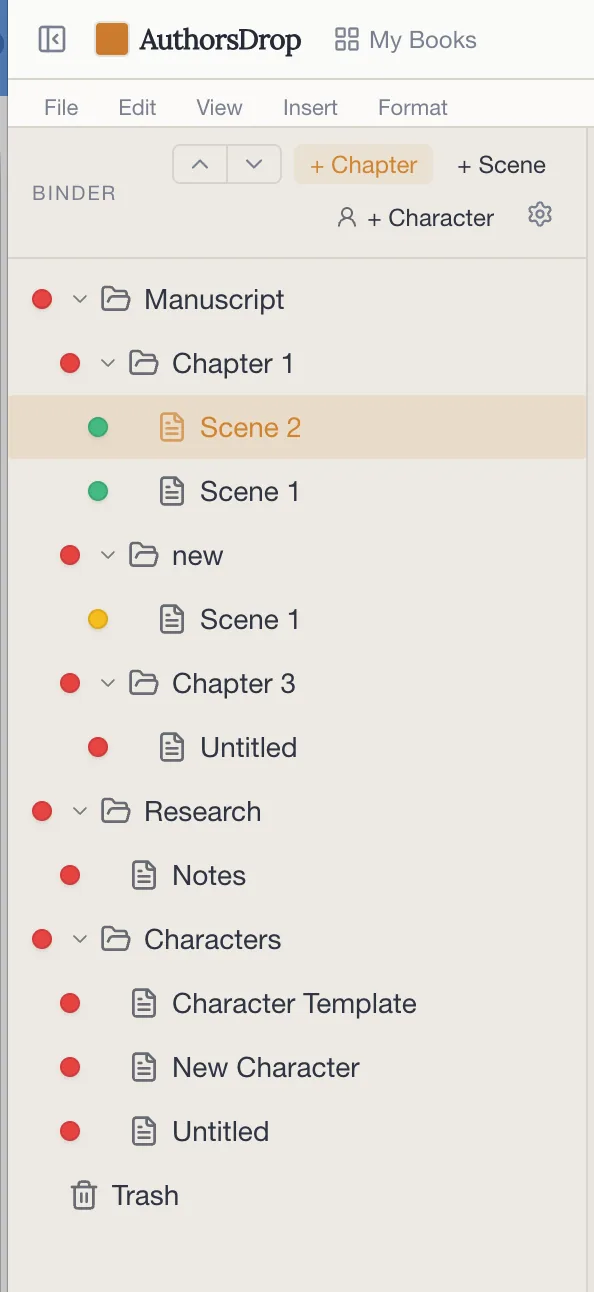
In AuthorsDrop, the Binder places chapters, scenes, research and characters in the same writing environment. The writer can move between sections of the manuscript without searching through Drive folders or scrolling through a long document.
This becomes valuable during editing. A scene can be opened directly. Research can sit beside the manuscript. A character record can be checked without leaving the project. The structure of the book remains visible.
Google Docs can store the words. AuthorsDrop helps organise the work around the words.
Scene-level writing matters
Google Docs is strongest when the document is the unit of work. AuthorsDrop is strongest when the scene is the unit of work.
That distinction matters. Writers often revise one scene, move one scene or make notes about one scene. Treating each scene as a managed part of the manuscript makes the book easier to reshape.
A long Google document can become a scroll. A collection of separate Google documents can become a filing system. AuthorsDrop tries to avoid both problems by keeping manuscript sections independent but connected.
Planning without turning writing into administration
AuthorsDrop gives each scene its own planning space. A synopsis, notes, status, labels and word goals can be attached to the work without becoming a separate spreadsheet or notebook.
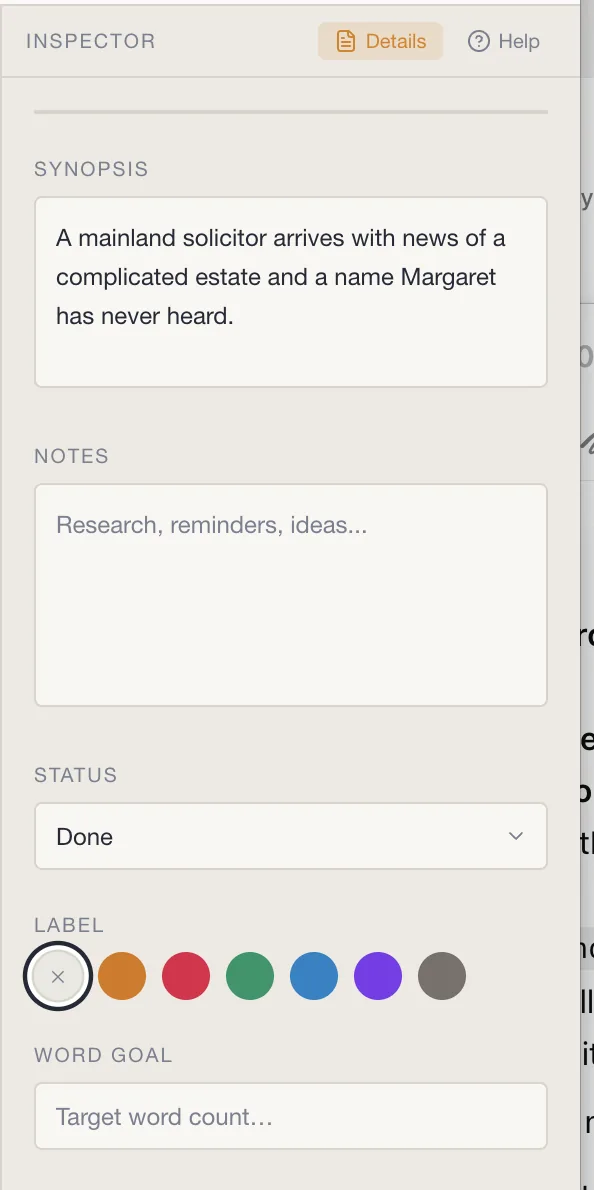
That does not mean every writer must plan heavily. It simply means the space is there when needed. A short reminder about what a scene must achieve can save time weeks later when the writer returns to revise.
Google Docs can imitate some of this with comments, headings and linked documents, but it remains a general document editor rather than a book-building environment.
Screenplays and stage plays
Google Docs can be persuaded to write scripts, but it does not naturally understand screenplay or stage play structure. Formatting usually depends on templates, add-ons or manual control.
AuthorsDrop includes dedicated project types for screenplays and stage plays. That matters because scriptwriting is not just a different font or indentation. It is a different writing rhythm with scene headings, action, character names, dialogue and transitions.
If your writing moves between fiction, scripts, stage work, non-fiction and academic projects, AuthorsDrop gives you a single place to manage that range.
Where Google Docs still belongs
This is not an argument for abandoning Google Docs. It remains extremely useful for sharing, comments and collaboration.
A practical workflow might be to write and organise the project in AuthorsDrop, then export selected chapters for feedback in Google Docs. That gives you the structure of a dedicated authoring tool and the convenience of Google’s collaboration environment.
The mistake is assuming one tool must do every job perfectly.
Who should choose Google Docs?
Google Docs is the right choice if collaboration is the centre of your work. It is also excellent for short documents, shared notes, classroom use, quick drafting and anything where immediate access from any browser matters more than deep manuscript organisation.
For writers working with editors, co-authors or students, it can be invaluable.
Who should choose AuthorsDrop?
AuthorsDrop is the stronger choice if you are writing a long-form project and need structure from the beginning. Novels, memoirs, non-fiction books, screenplays, stage plays and dissertations all benefit from having chapters, scenes, research and notes arranged in one deliberate workspace.
If Google Docs feels like a blank page with sharing attached, AuthorsDrop feels like a writing desk built for the whole project.
Final verdict
Google Docs is excellent for collaboration. AuthorsDrop is built for long-form authorship.
If you are working on a shared document, Google Docs may be the easier choice. If you are building a book or script with chapters, scenes, research, characters and revision, AuthorsDrop gives the project a structure that Google Docs does not attempt to provide.
The strongest answer may be to use both: AuthorsDrop to create and organise the work, Google Docs when you need easy feedback and collaboration.
Frequently asked questions
Can I write a book in Google Docs?
Yes. Google Docs can be used to write books, especially shorter or collaborative manuscripts. The challenge is that chapters, research, character notes and structure usually require manual organisation.
Where is Google Docs stronger than AuthorsDrop?
Google Docs is especially strong for real-time collaboration, simple sharing and browser-based document editing. It is very useful when several people need to comment on or edit the same document.
Where is AuthorsDrop stronger than Google Docs?
AuthorsDrop is stronger for long-form structure, because it treats the manuscript as a project made of chapters, scenes, research, characters, notes and export-ready material.
Should I use both?
Many writers can use both: AuthorsDrop for drafting and organising the project, then Google Docs for sharing selected exported material with beta readers, collaborators or reviewers.
Source note
This comparison was written with reference to Google’s public product information describing Google Docs as an online document editor with real-time collaboration, sharing, Word-file editing and assistive features.